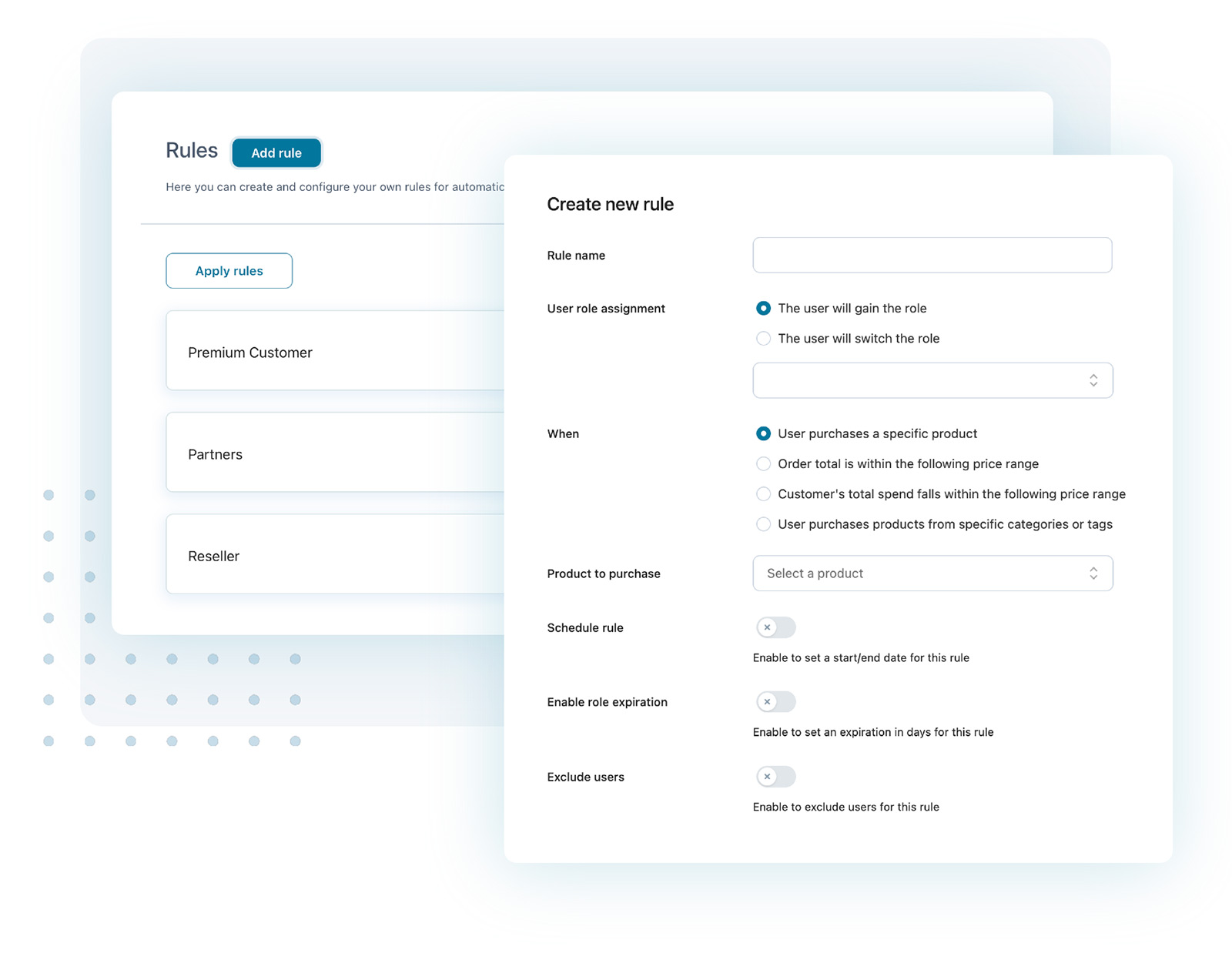
Woocommerce Plugin for Role Pricing

Woocommerce Plugin for Role Pricing: Boost Sales with Smart Discounts

If you run a WordPress store using Woocommerce, you may want to sell products at different prices for different people. This is where a Woocommerce Plugin for Role Pricing helps you. In this article, I will explain what this plugin does and why you need it.

What is Woocommerce Plugin for Role Pricing?

A Woocommerce Plugin for Role Pricing is a WordPress plugin. It lets you set different prices for your products based on the user’s role.

For example, you can sell a product at one price to regular customers and a lower price to wholesalers or VIP members. This makes selling easier and fairer for different groups of users.

Why Do You Need Role Pricing?

  • Sell to different groups: You can set prices for customers, wholesalers, or special members.
  • Boost sales: Offering discounts to special users can increase sales.
  • Manage user roles: The plugin works with WordPress user roles to control who sees what price.
  • Easy price control: Change prices quickly without editing product details one by one.

How Does the Woocommerce Plugin for Role Pricing Work?

Once you install the plugin, it connects with your Woocommerce store and WordPress user roles. You can then assign prices based on the role.

Here is a simple step-by-step on how it works:

  1. Install and activate the plugin on your WordPress site.
  2. Go to the plugin settings to set up user roles and prices.
  3. Assign different prices for each user role for every product.
  4. When a user logs in, they see prices based on their role.
  5. Users without roles see the default prices.

Top Features of a Good Woocommerce Plugin for Role Pricing

Choosing the right plugin is important. Here are some must-have features:

Feature Description
Role-Based Price Setup Allows setting prices for each user role easily.
Multiple Role Support Supports many roles like customers, wholesalers, members.
Easy User Interface Simple dashboard to manage prices without coding.
Compatibility Works well with latest WordPress and Woocommerce versions.
Price Display Control Shows or hides prices based on user roles.
Bulk Price Editing Edit prices for many products at once.
Custom Role Support Works with custom user roles created by you.

Best Woocommerce Plugin for Role Pricing Options

There are many plugins available. I will list some popular ones to help you decide.

1. Woocommerce Role Based Pricing

  • Allows different prices for each user role.
  • Easy to use and setup.
  • Supports discounts and markups.
  • Good for small and big stores.

2. Dynamic Pricing And Discounts For Woocommerce

  • Offers role-based pricing and bulk discounts.
  • Flexible rules for pricing.
  • Integrates well with other WooCommerce features.
  • Good for advanced pricing needs.

3. Woocommerce Wholesale Prices

  • Great for wholesale store owners.
  • Set wholesale prices per role.
  • Simple interface and setup.
  • Allows hiding prices from guests or non-wholesale users.

 
Woocommerce Plugin for Role Pricing: Boost Sales with Smart Discounts

Credit: yithemes.com

You must Read: Woocommerce Plugin for Faq


Benefits of Using a Woocommerce Plugin for Role Pricing

Using role pricing plugins gives many benefits. Here are some key advantages:

  • Personalized Pricing: Different users see prices just for them.
  • Increase Sales: Discounts for special roles encourage buying more.
  • Easy Store Management: Manage all prices in one place without hassle.
  • Better User Experience: Customers feel valued when they get special prices.
  • Improve Marketing: Target specific user groups with price offers.

How to Choose the Right Woocommerce Plugin for Role Pricing?

Picking the right plugin depends on your needs. Here is a simple checklist:

  • Check Compatibility: Make sure it works with your WordPress and Woocommerce versions.
  • Look for User Reviews: See what other users say about the plugin.
  • Easy Setup: Choose a plugin that is simple to install and use.
  • Feature Set: Ensure it has role pricing and other needed features.
  • Support and Updates: A good plugin gets regular updates and support.
  • Price: Some plugins are free, others cost money. Pick what fits your budget.

How to Install a Woocommerce Plugin for Role Pricing?

Installing a plugin on WordPress is easy. Follow these steps:

  1. Log in to your WordPress admin dashboard.
  2. Go to Plugins > Add New.
  3. Search for “Woocommerce Plugin for Role Pricing” or the plugin name.
  4. Click Install Now next to the plugin.
  5. After installation, click Activate.
  6. Go to plugin settings to configure roles and prices.

Tips for Using Woocommerce Plugin for Role Pricing

  • Test Different Roles: Make sure prices show correctly for each user role.
  • Keep Prices Updated: Review prices regularly to stay competitive.
  • Use Clear Role Names: Name roles so you remember which price is for who.
  • Backup Your Site: Before major changes, always backup your WordPress site.
  • Combine with Discounts: Use role pricing with coupons for more sales.

Common Questions About Woocommerce Plugin for Role Pricing

Q1: Can I Set Different Prices For Each Product And User Role?

Yes, most plugins let you assign prices per product and user role.

Q2: Does This Plugin Work With Custom User Roles?

Yes, many plugins support custom roles you create.

Q3: Can I Hide Prices From Users Who Are Not Logged In?

Yes, you can set price visibility based on login status.

Q4: Are These Plugins Free Or Paid?

Some plugins are free with basic features; premium versions cost more.

Q5: Will Role Pricing Affect My Store’s Performance?

If you choose a well-coded plugin, your store will run smoothly.

 
Woocommerce Plugin for Role Pricing: Boost Sales with Smart Discounts

Credit: es.wordpress.org

Frequently Asked Questions

What Is Woocommerce Plugin For Role Pricing?

It allows setting different prices for different user roles. You can offer discounts or special rates easily.

How To Set Role-based Prices In Woocommerce?

Install the plugin, create user roles, then assign specific prices to each role. Simple steps guide you.

Can I Offer Discounts To Wholesale Customers Only?

Yes, the plugin lets you set special prices for wholesale or any user group. No coding needed.

Does Role Pricing Work With All Woocommerce Products?

Yes, you can apply role pricing to simple, variable, or grouped products. Flexible for all types.


If you want to sell products at different prices for different users, a Woocommerce Plugin for Role Pricing is a smart choice.

It helps you manage prices easily, improve sales, and offer a better shopping experience.

Choose a plugin that fits your needs, install it, and start setting prices by roles today!

Thanks for reading! If you found this article helpful, share it with your friends.

Leave a Reply

Your email address will not be published. Required fields are marked *