Woocommerce Plugin for Checkout Field: Boost Sales with Customization
If you run an online store using WordPress, you need a great checkout process. Woocommerce Plugin for Checkout Fields helps you make your checkout page better. It lets you add new fields, change old ones, and make buying easy for customers.
What Is Woocommerce Plugin for Checkout Fields?
This plugin is a tool for WordPress websites using Woocommerce. It lets you change the checkout page. You can add boxes where customers type their info. You can also remove or move fields.
For example, if you want to ask for a customer’s birthday or special notes, this plugin helps you do that. It makes your store look professional and collects the right info.
Credit: wordpress.org
Why Use a Woocommerce Plugin for Checkout Fields?
Customize Your Checkout: Add or remove info fields easily.
Better Customer Experience: Make checkout simple and fast.
Collect More Info: Get extra details like gift messages or phone numbers.
Increase Sales: A smooth checkout means more happy buyers.
Top Features of Woocommerce Plugin for Checkout Fields
Here are some common features you get with these plugins:
Feature
What It Does
Add Custom Fields
Insert extra boxes for info like phone or notes.
Edit Existing Fields
Change labels, placeholders, or make fields required.
Rearrange Fields
Move fields up or down for better flow.
Conditional Fields
Show certain fields only if needed, like gift options.
Save and Export Data
Keep customer info safe and export it easily.
Mobile Friendly
Works well on phones and tablets.
How to Choose the Best Woocommerce Plugin for Checkout Fields
Picking the right plugin is important. Here are tips to help you choose:
Easy to Use: The plugin should be simple for beginners.
Good Reviews: Check what other users say about it.
Compatible: Make sure it works with your WordPress and Woocommerce versions.
Support: Choose plugins with good help from the developers.
Features: Look for the features you need like custom fields or conditional logic.
Free or Paid: Decide if you want a free version or more advanced paid plugin.
Popular Woocommerce Plugins for Checkout Fields
Here are some popular plugins you can try:
Checkout Field Editor (by WooCommerce) – Official and easy to use.
Flexible Checkout Fields – Adds many field types and customization.
WooCommerce Checkout Manager – Great for editing and adding fields.
YITH WooCommerce Checkout Manager – Offers advanced control with a simple interface.
Credit: www.themehigh.com
Step-by-Step Guide to Add Fields Using a Woocommerce Plugin
Follow these simple steps to customize checkout fields:
Install the Plugin: Go to WordPress dashboard > Plugins > Add New.
Search for the Plugin: Type “Checkout Field Editor” or your choice.
Install and Activate: Click “Install” then “Activate”.
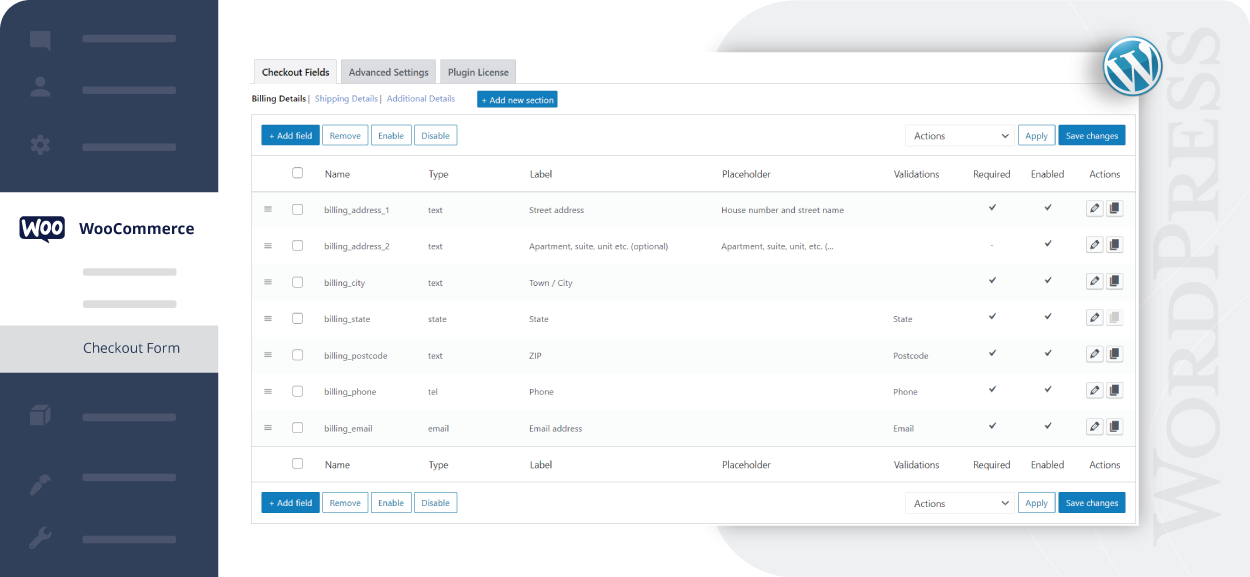
Open Plugin Settings: Find it under WooCommerce > Checkout Fields.
Add New Field: Click “Add Field”, choose field type (text, checkbox, etc.).
Set Field Details: Name the field, add placeholder text, and choose if required.
Save Changes: Always save before leaving the page.
Test Your Checkout: Go to your store and check the new field.
Benefits of Customizing Checkout Fields
Using a Woocommerce Plugin for Checkout Fields brings many benefits:
Collect Important Data: Ask customers exactly what you need.
Reduce Cart Abandonment: Make checkout quick and easy.
Improve Order Accuracy: Get clear instructions or info from buyers.
Offer Personalization: Allow gift messages or delivery instructions.
Enhance User Experience: A nice checkout page keeps customers happy.
Common Types of Checkout Fields to Add
Here are some field types you can add to your checkout page:
Text Box: For names or special notes.
Dropdown: Let customers pick options like color or size.
Checkbox: For agreements or extra options.
Date Picker: Choose delivery or event dates.
Phone Number: Collect contact info easily.
Tips to Make Checkout Fields Effective
Keep It Simple: Don’t ask for too much info.
Use Required Fields Wisely: Only make important fields mandatory.
Label Clearly: Use easy words so customers understand.
Test Regularly: Check your checkout to avoid errors.
Mobile Friendly: Ensure fields work well on phones.
Why You Need a Woocommerce Plugin for Checkout Fields
In short, a Woocommerce Plugin for Checkout Fieldsmakes your store better. It helps you get the right info. It improves shopping experience. This leads to happy customers and more sales. You don’t need coding skills to use it. Just pick a good plugin and start customizing your checkout today!
Remember, a smooth checkout is key to success in online selling. Use a trusted Woocommerce plugin and watch your business grow.
Frequently Asked Questions
What Is A Woocommerce Plugin For Checkout Fields?
A WooCommerce plugin for checkout fields lets you add, edit, or remove fields on your checkout page. It helps customize the checkout to fit your store’s needs.
How Do Woocommerce Checkout Field Plugins Improve User Experience?
They make the checkout process easier and faster by showing only needed fields. This reduces confusion and cart abandonment.
Can I Add Custom Fields To Woocommerce Checkout?
Yes, these plugins allow you to add custom fields like text, dropdowns, checkboxes, and date pickers. You can collect extra info from customers.
Are Woocommerce Checkout Field Plugins Easy To Use?
Most plugins have simple interfaces with drag-and-drop or form builder tools. No coding skills are needed to customize checkout fields.