Phone:
(701)814-6992
Physical address:
6296 Donnelly Plaza
Ratkeville, Bahamas.

Phone:
(701)814-6992
Physical address:
6296 Donnelly Plaza
Ratkeville, Bahamas.

If you run an online store, you know checkout is very important. The checkout page is where customers finish their orders. It needs to be easy and clear. But sometimes, the default checkout form in WooCommerce does not fit your needs. You might want to add new fields or remove some. Or maybe change the order of fields. This is where a WooCommerce plugin to edit checkout fields helps.
Checkout fields are boxes or options customers fill in when they buy something. These fields ask for details like name, address, phone number, and email. Sometimes shops need extra information. For example, a gift message, delivery instructions, or customer notes.
WooCommerce has default checkout fields. These work well for many stores. But each store is different. So, you might want to change the fields to match your needs.
Credit: wordpress.org
Credit: www.themehigh.com
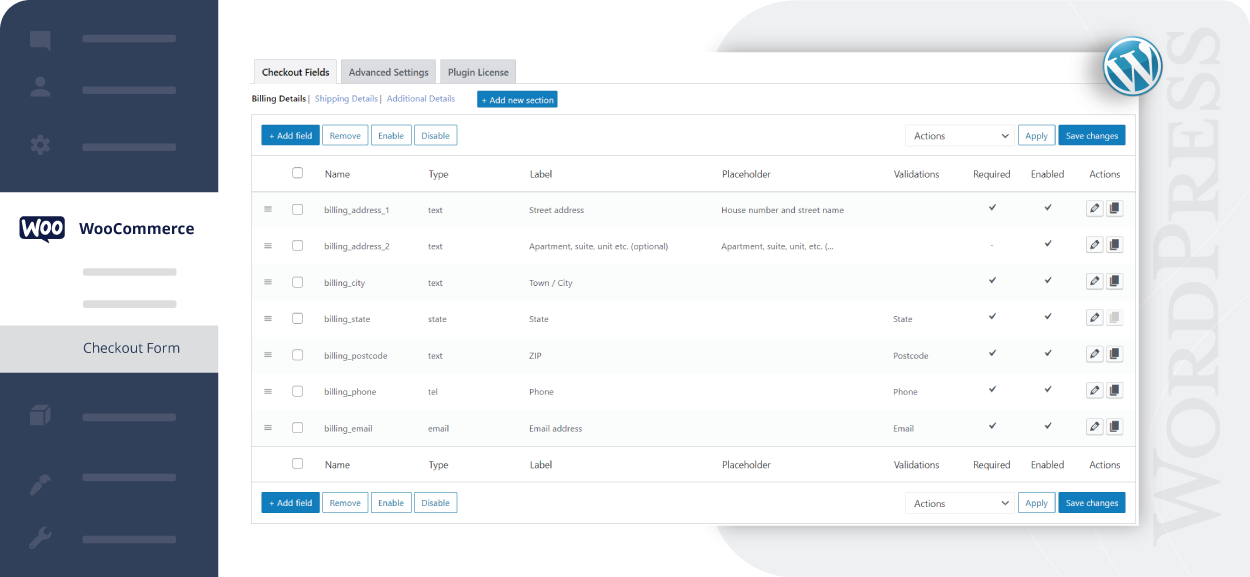
These plugins add an easy way to change checkout fields. You do not need to know code. Most plugins have a simple interface with drag and drop. You can add new fields like text, select boxes, checkboxes, or date pickers. You can also hide or delete fields you do not want.
After you finish, the checkout page will show your new form. Customers will see the fields you added or changed.
There are many plugins to help you edit checkout fields. Some are free, and some are paid. Here are a few popular options:
| Plugin Name | Free or Paid | Main Features | Where to Get |
|---|---|---|---|
| Checkout Field Editor for WooCommerce (ThemeHigh) | Free & Paid | Add, edit, delete fields; drag and drop; support for many field types | WordPress.org |
| WooCommerce Checkout Field Editor (Official Extension) | Paid | Easy to add/remove fields, change labels, reorder fields | WooCommerce.com |
| Checkout Manager for WooCommerce | Free | Add/remove/edit fields, supports custom validation | WordPress.org |
Editing checkout fields is easy with these plugins. Here is a simple guide you can follow:
You must read: Woocommerce Plugin for Image Zoom
These are some popular field types you can add using a WooCommerce checkout field editor plugin:
Custom checkout fields give many benefits. Here are the main ones:
| Benefit | Why It Helps |
|---|---|
| Collect More Data | Get the exact information you need from customers. |
| Better Customer Experience | Make checkout fast and easy with only needed fields. |
| Reduce Cart Abandonment | Simple forms mean fewer customers leave before buying. |
| Easy to Use | No coding needed to change the checkout form. |
| Flexible | Change fields anytime to fit your store’s needs. |
| Professional Look | Custom fields make your store look more polished. |
If you do not edit your checkout fields, you might face some problems. For example:
Editing checkout fields helps avoid these issues. It makes your checkout page better for buyers.
A WooCommerce plugin to edit checkout fields lets you change the fields on your checkout page. You can add, remove, or modify fields easily without coding.
Customizing checkout fields helps collect the right customer information. It improves user experience and can boost sales by simplifying the checkout process.
You can add new fields by selecting the field type and placing it on the checkout form. The plugin interface is user-friendly and requires no coding.
Yes, this plugin allows you to hide or delete default fields you don’t need. This keeps the checkout page clean and focused.
Yes, you can drag and drop fields to change their order. This helps you organize the checkout form for better flow.
Most WooCommerce checkout field editor plugins ensure the fields look good on mobile devices. Your customers will have a smooth checkout on any device.
No coding skills are needed. The plugin offers a simple interface to manage checkout fields with just a few clicks.
Many plugins offer a preview option or allow you to test changes safely. This helps you avoid errors on the live checkout page.
Editing checkout fields in WooCommerce is a smart step for any online store. A plugin makes this task simple. You can add, remove, or reorder fields without coding. This helps collect the right customer info. It also makes checkout easier and faster. Many free and paid plugins are ready to use. Pick one that fits your needs. Customize your checkout form today for a better shopping experience.