Phone:
(701)814-6992
Physical address:
6296 Donnelly Plaza
Ratkeville, Bahamas.

Phone:
(701)814-6992
Physical address:
6296 Donnelly Plaza
Ratkeville, Bahamas.

If you use WordPress for your website, you may want to change the footer credits. Footer credits are the small texts at the bottom of your site. They often say the theme name or the creator’s name.
Sometimes, you want to remove or change these credits. But how do you do it? This guide will show you simple ways to remove WordPress theme footer credits.

Credit: www.youtube.com
Footer credits are words or links at the bottom of your website. They usually say things like “Theme by XYZ” or “Powered by WordPress.”
These credits come with your WordPress theme. Some themes let you change them easily. Others do not.
Many people want to remove or edit these credits. They want their website to look clean or have their own name there.
Before you remove footer credits, think about rules. Some themes ask you to keep credits. They have a license called GPL. It lets you change the theme, but sometimes you must keep credits.
Check your theme’s rules. Look on the theme website or documentation. If it says you can remove credits, then you can do it.
If you bought a theme, check the license. Some premium themes let you remove footer credits easily.
Here are simple ways to remove or change footer credits. Choose the way that works best for you.
Many modern WordPress themes have a built-in option to edit footer credits. This is the easiest way.
This method works only if your theme supports it. If you do not see these options, try the next methods.
You must Read: WordPress Theme for Logistics Company
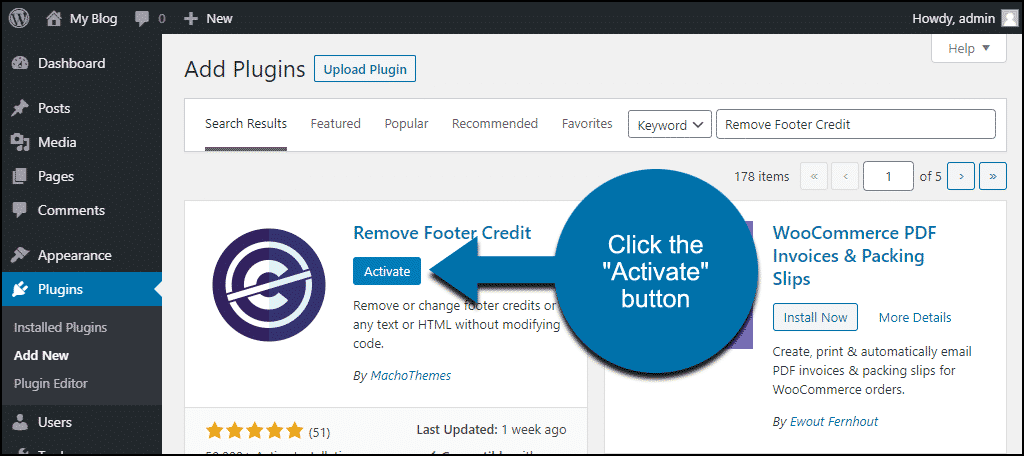
You can use plugins to change footer credits easily. Plugins are tools that add extra features to WordPress.
One popular plugin is “Remove Footer Credit.” It helps you find and change footer text.
Plugins are good for beginners. They do not need coding knowledge.
This method needs a little care. You will change the theme’s code.
Follow these steps:
Important: Always backup your site before editing files. One small mistake can break your website.
If you do not see footer.php or feel unsure, ask for help from a developer.
You must Read: Best WordPress Plugin for Speed Optimization
If you don’t want to change code, you can hide footer credits with CSS.
CSS is a style language that changes how your site looks.
Here’s how:
Example CSS code:
.footer-credit, .site-info {
    display: none;
}
This code hides the footer credits. But the credits are still in your site code. Just not visible.
Use this method if you don’t want to edit files.
If you want to keep your changes safe, use a child theme.
A child theme is a copy of your theme. It lets you change code without losing edits after updates.
Steps to create a child theme:
This method is for users with some coding knowledge.
Credit: www.greengeeks.com
Footer credits show the theme creator’s name. It gives them credit for their work.
It also helps visitors know what theme you use.
Sometimes, credits link to the theme’s website. This helps the theme maker get visitors.
If you want, you can replace the credits with your own text or link. Just follow the steps above.
| Method | Skill Level | Works Without Coding? | Safe with Updates? |
|---|---|---|---|
| Theme Customizer | Beginner | Yes | Yes |
| Plugin (Remove Footer Credit) | Beginner | Yes | Yes |
| Edit footer.php | Intermediate | No | No |
| Custom CSS (Hide Credits) | Beginner | Yes | Yes |
| Child Theme Edit | Advanced | No | Yes |
Removing WordPress theme footer credits is easy with the right method.
Start with the theme customizer or a plugin if you are new. These are safe and simple.
If you know some coding, editing footer.php or using a child theme is better.
Always check the theme rules before changing footer credits.
Keep your website backed up. This keeps your work safe.
Now, you can make your website look the way you want.
Edit the footer. php file or use a child theme to safely delete or change footer credits.
Direct edits can be overwritten by updates. Use a child theme for safe, lasting changes.
Yes, some plugins let you hide or replace footer credits without touching code.
Removing credits usually does not affect SEO but keep essential links intact for credibility.